
KAILORA · INVOICING
GST invoicing without the portal-hopping
Raise the invoice in Kailora and everything compliance needs happens from the same screen: CGST/SGST/IGST resolved from place of supply, e-invoice IRN registered, e-way bill generated. No copy-pasting into a government portal at 6 pm.
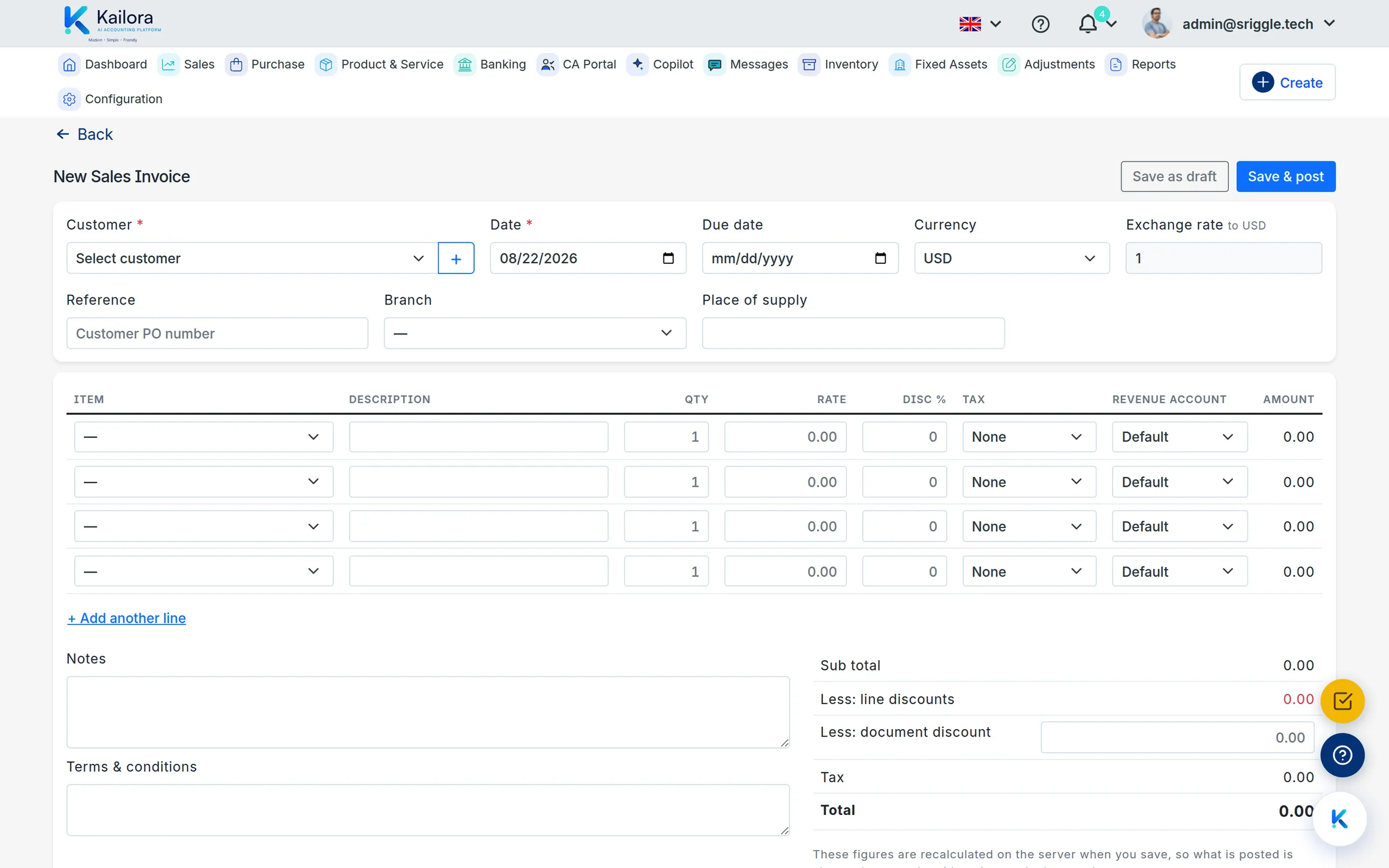
The tax engine does the thinking
Pick the customer and the items; Kailora resolves the right GST split from GSTINs and place of supply, applies item-level rates, and totals it to the paisa. Estimates convert to orders, orders to invoices, and credit notes reference the original document so your GSTR workings stay clean.
e-Invoice and e-way bill, from the invoice
Where e-invoicing applies, register the IRN from the invoice itself and the QR code lands on the print. Goods moving? Generate the e-way bill with the same data — typed once, used everywhere.
Invoices your brand can sign
Templates carry your logo, numbering series are per document type and entity — with the number shown up front on every editor and a pencil to take control of it when you need to — and recurring invoices raise themselves on schedule. From the phone, you can raise and send an invoice before you've left the customer's office — or scan their signed copy straight back into the record.
From Excel or from paper, without retyping
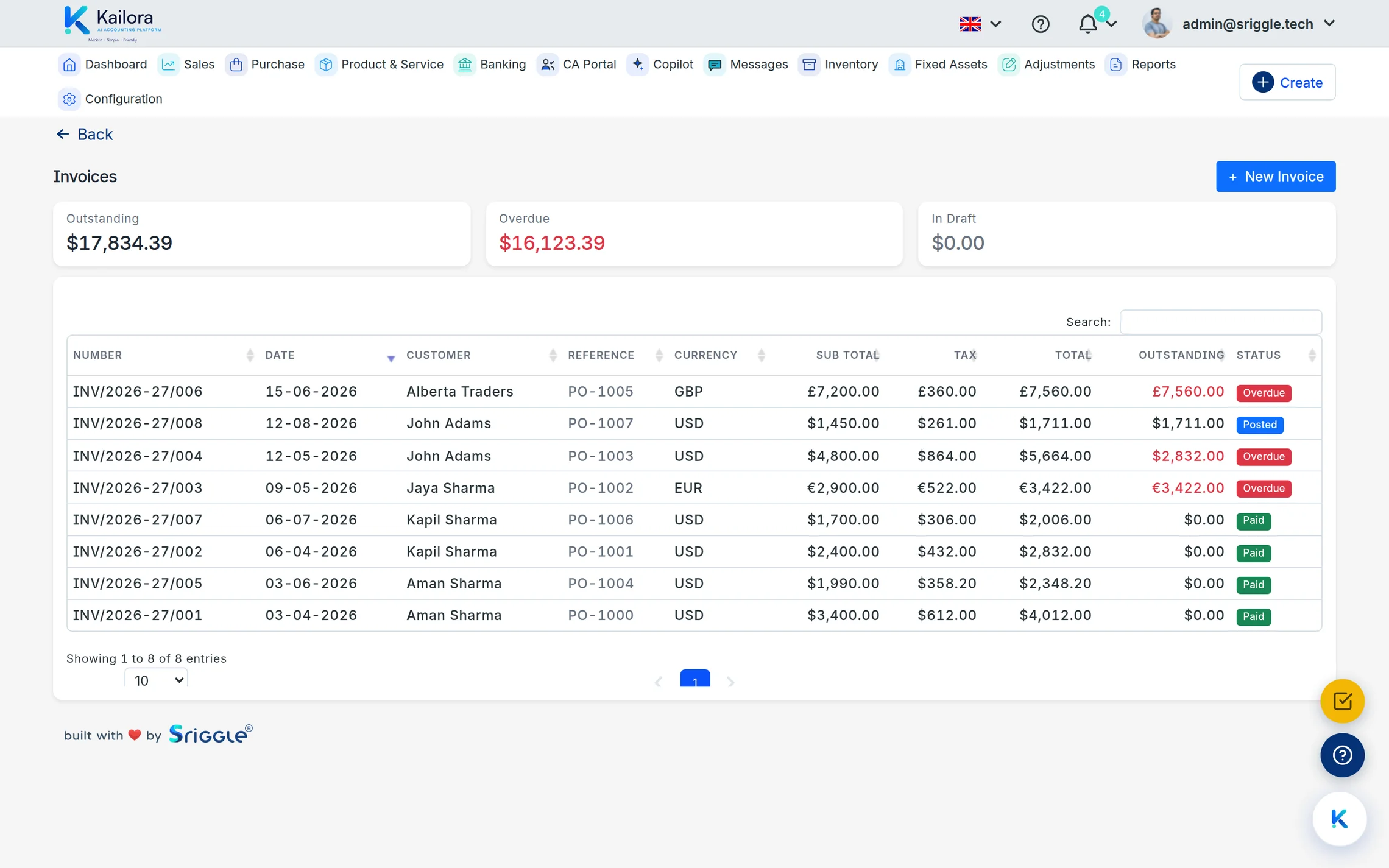
Invoices that already exist somewhere else don't need to be keyed in again. Fill Kailora's Excel template — one row per line item — and import one invoice or a hundred at once: a preview shows every document with its checks, customers not yet on file are created only with your permission, and you choose whether the batch posts immediately or lands as drafts. Got a paper invoice? Scan it (one at a time) and the editor fills itself, keeping the invoice's own number.
Straight from the product
Real screens from a live Kailora — not mockups.
Common questions
Does Kailora support credit notes and debit notes?
Yes — both, linked to their source documents, alongside estimates, orders, recurring invoices and expenses.
Can I invoice in other currencies?
Yes. Multi-currency documents book against your base currency with the rate captured on the document.
Can I import invoices from Excel?
Yes — download the template on the Invoices screen, fill one row per line item, and upload one or many invoices at once. A preview shows every invoice with its checks; customers not on file are created only with your permission, and nothing is saved until you confirm.
Can I edit or delete a posted invoice?
Drafts are free to edit or delete — saving posts nothing until you confirm with one click. A posted invoice is corrected in the open: Amend reverses the entry (both entries stay on file) and reopens the same number for editing, or Cancel posts a reversal and keeps the number on record — numbers are never reused. Once money is allocated, adjust with a credit note instead. That is IFRS and GAAP practice, built in.
Can I round an invoice total to whole rupees?
Yes. Every sales and purchase document has a Round off line just above the total: type a positive amount to round up, a negative one to round down, or click auto to land on the nearest whole rupee. The adjustment stays under 10, rides inside the total so the receivable is exactly what the customer owes, and its other leg posts to a Rounding difference account — the entry always balances.
Works even better with
Tax Center
GSTR-1 and 3B workings, e-invoice and e-way bill status, TDS/TCS tracking with section-wise summaries
Expenses & Purchases
Photograph supplier bills and expenses; AI reads them into drafts with vendor, GST and TDS matched
Customer & Vendor Portals
Give customers and vendors their own portal: invoices, statements, outstanding balances and payment status, without another email thread.
Give your books the week off.
Start free — no card, no lock-in. Your data stays exportable, always.